[vc_row][vc_column width=”1/1″][heading title_size=”title-size-large” text_align=”center” text_color=”blue” custom_attribs=”line” subtitle=”A complete guide to signing up with us at Kotoba Miners”]
Sign up and start learning Japanese!
[/heading][vc_column_text]
So, you are interested in learning Japanese with us over on Kotoba Miners?
That’s awesome!
Please come to a trial lesson. This guide will help you get set up.
[/vc_column_text][/vc_column][/vc_row][vc_row][vc_column width=”1/1″][heading title_size=”title-size-large” text_align=”center” text_color=”blue”]
Install Minecraft
[/heading][/vc_column][/vc_row][vc_row][vc_column][vc_column_text]
Head over to Mojang and install Minecraft. (Link)
Add our server:

[/vc_column_text][/vc_column][/vc_row][vc_row][vc_column width=”1/1″][heading title_size=”title-size-large” text_align=”center” text_color=”blue” subtitle=”Speak with peers and listen to the teacher!”]
Install TeamSpeak
[/heading][/vc_column][/vc_row][vc_row][vc_column width=”1/1″][vc_column_text]
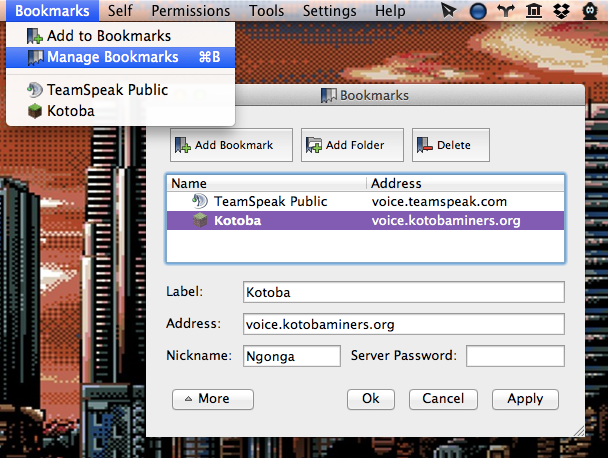
Please follow this guide.
[/vc_column_text][/vc_column][/vc_row][vc_row][vc_column width=”1/1″][heading title_size=”title-size-large” text_align=”center” text_color=”blue” subtitle=”To keep up to date with events”]
Register on the forum || Check class times
[/heading][/vc_column][/vc_row][vc_row][vc_column width=”1/1″][vc_column_text]
Please make your forum username the same as your Minecraft username. (Link)
Class times can be found here.
Or on the forums here.
[/vc_column_text][/vc_column][/vc_row]